Reports
Reports menu. Account metrics for a period. Owners, admins and agents with the Reports permission can see it. If you don't have access, the screen tells you and asks you to have an account admin enable it.
Top of the page
- Choose the period. Default: Last 28 days (ends yesterday, not today). There are also short ranges and a custom one.
- If there are several inboxes, filter by one or leave All.
- Optional: Generate executive summary with AI. It generates a headline, findings and recommendations for the period. It doesn't replace the cards: it's supporting text.
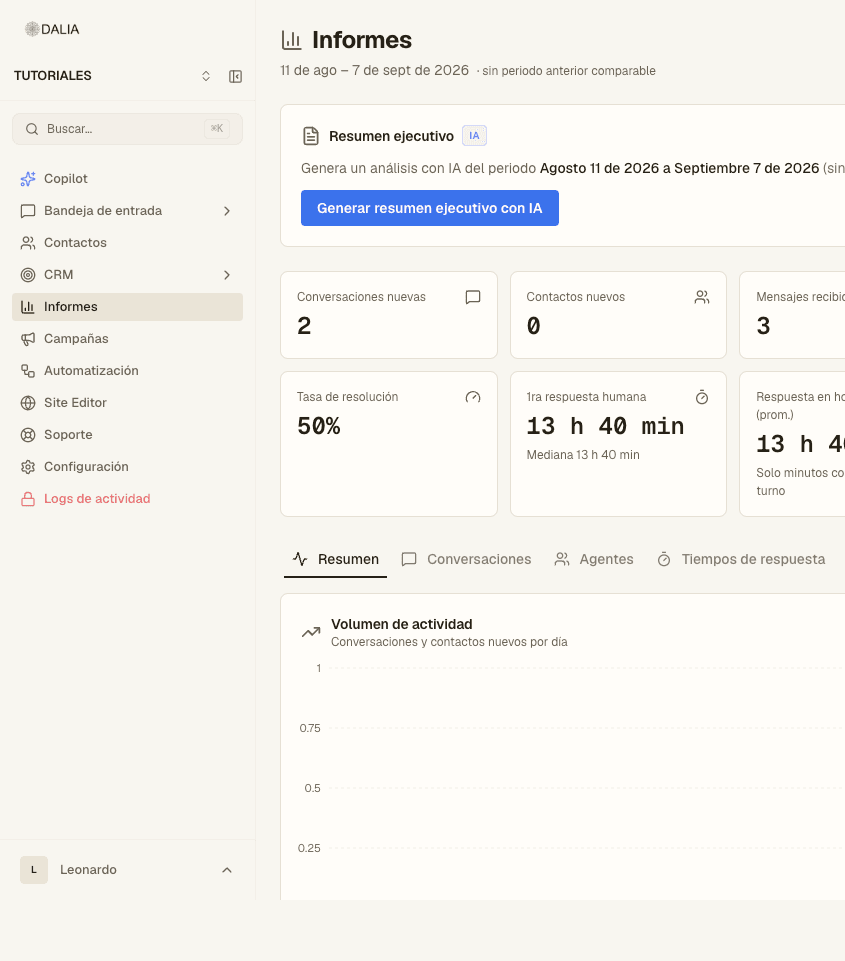
Cards at the top
These usually appear (depending on data and modules):
- New conversations, New contacts.
- Messages received and Messages sent.
- Resolved conversations and Resolution rate.
- First human response (average and median). There's a variant that only counts minutes while the agent is on shift: Response during business hours.
- AI coverage — what share was answered by the AI agent versus a person.
Each card can show the change versus the previous period. If there is no comparable period, it says so.
Tabs
- Summary — activity volume (conversations and contacts per day), messages received versus sent, channels.
- Conversations — statuses, resolution, SLA (critical and warnings).
- Agents — assigned, resolved and first response per person. Click a person to open their breakdown.
- Response times — distribution and business hours.
- Revenue — only if the account has CRM: won deals, amount, average deal size, close rate. In the account's currency.
- Attribution — where contacts came from (ad, widget, organic). It's the bridge between the chat and the result.
- AI Analyst — generated reports (demand, sentiment, etc.). It may require a plan or an extra permission.
Plan usage (cap on AI conversations, Copilot, campaigns for the day) is in Settings → Usage, not in Reports. See Settings.