CRM
Leads and opportunities. It only appears if the module is active and your user has permission. Menu: CRM → Leads, Opportunities, Calendar and (administrators) Pipelines.
Lead or opportunity
A lead is someone you are still qualifying. Default stages: New, Contacted, Qualified, Not qualified. Once converted, it leaves Leads and becomes an opportunity.
An opportunity is the deal. Default stages: Prospect, Contacted, Proposal, Negotiation, Won, Lost.
Board and list
The kanban board has one column per stage. Drag a card to change its stage. The list view is for filtering, sorting and bulk actions: delete, mark as lost or convert.
Typical filters: advisor, pipeline, stage, date, source. New records usually appear at the top of the first column.
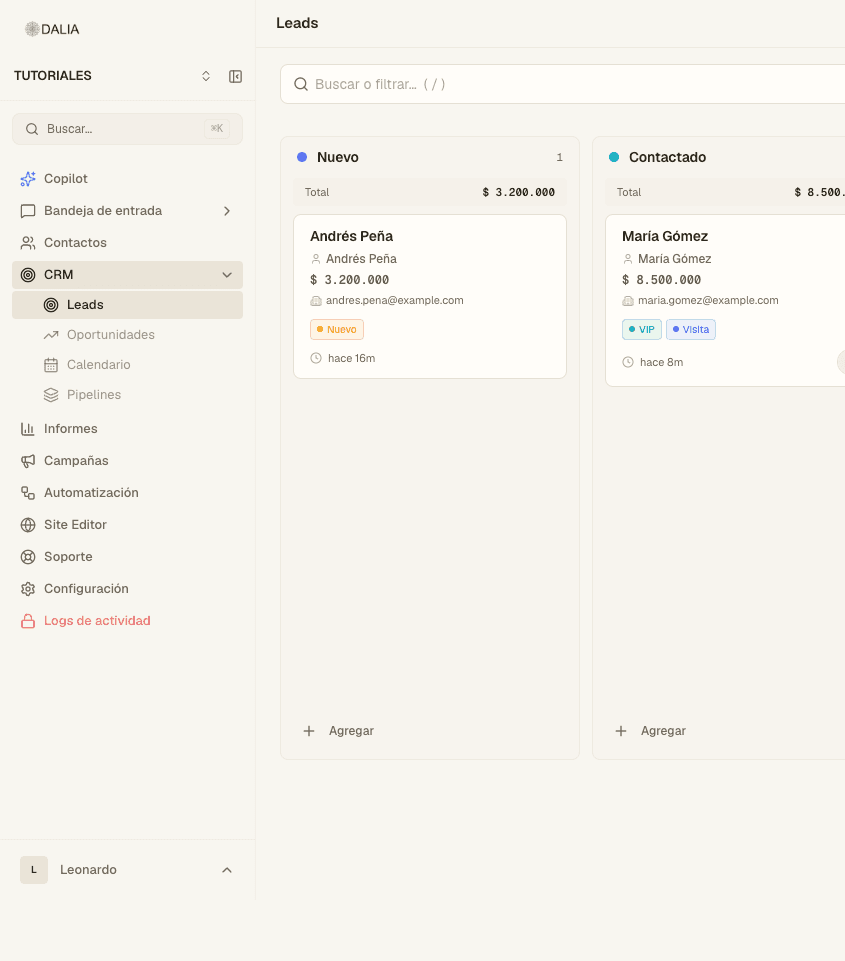
The record panel
When you open a card you see, usually in this order:
- Contact (name, phone, email). One click opens the record in Contacts.
- Advisor, source (where they came from), stage, estimated value and close date (on opportunities).
- Properties of interest, if the properties module is active. Search for them by name or code. When the lead is converted, they are copied to the opportunity.
- Activities: call, meeting, task, note. They stay in the history.
- Stage change history.
- Fields you have defined (Settings → Attributes).
Convert a lead
- Open it.
- Use the Convert action (on the record or as a bulk action in the list).
- Choose the opportunity pipeline and, if it asks, the initial stage.
- The lead stops being listed in Leads. Global search doesn't show it either, to avoid duplicating the opportunity.
From the chat
In the inbox, the CRM tab in the right panel shows that person's leads and opportunities, or the Create lead button. The AI agent can look up properties or create a lead if those tools are turned on in the AI agent tab.
Calendar
CRM → Calendar. Dated activities (meeting, task, visit). It isn't Google Calendar: that one is connected in Integrations and turned on in the inbox. See Google Calendar.
Pipelines
CRM → Pipelines (administrators). You rename stages, change the order, and mark which ones are Won or Lost. Settings → Pipelines and stages does the same thing from Settings.
A flow can move a lead to another stage, qualify it, convert it or create an activity. See Automations.
Website forms
If you use a DALIA capture form (Settings → Embeddable forms, when the module is active), the submission creates a lead in the New stage and saves which page or ad it came from, if there is attribution.
Day-to-day conversations still happen in the inbox.