Plans and billing
Settings → Billing (Account group). The screen title is Billing & subscription: "Manage your plan, payments and subscription." Only people with the billing permission (in practice, the owner) see billing. Current prices are on that screen, not here: they change.
The public list of plans is at dal-ia.com/precios.
If there is no plan yet
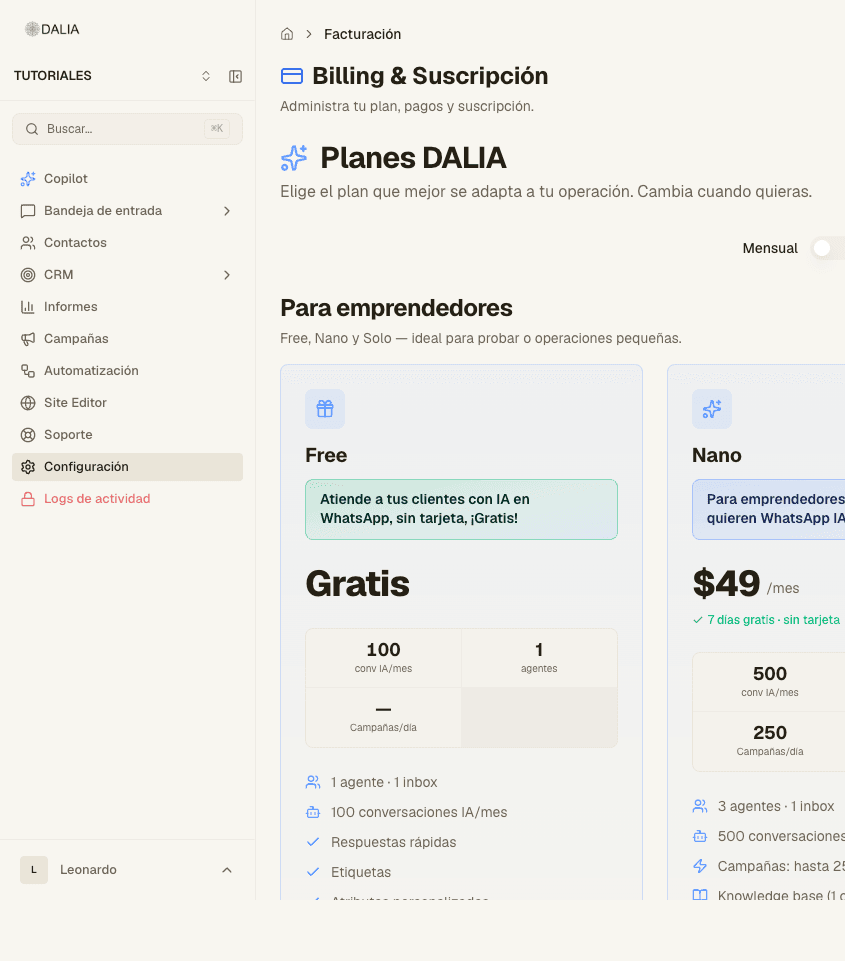
In the Settings hub, the Billing row says No active plan. When you open it, the same page shows the DALIA plans selector ("Choose the plan that best fits your operation"). At the top you can switch from Monthly to Annual (annual shows the discount).
Plans are grouped (for example "For entrepreneurs"). Each card has: name, price, cap on AI conversations, team members, campaigns and the list of what's included. The button changes depending on the case: Get started with…, Upgrade to…, Switch to… or Current plan — View billing. The Free plan usually says "New accounts only".
Subscribing or switching plans
- Choose a plan and period. The same selector is also in Settings, in the plans row.
- Payment goes through Stripe. When you confirm, the webhook activates the account.
- A plan change is prorated. If you downgrade, whatever exceeds the new cap becomes read-only.
Once you have a subscription
In Billing these appear, depending on the status:
- Pay now — pending payment or trial.
- Change plan — goes back to the selector.
- Manage in Stripe — cards and invoices in the Stripe portal.
- Cancel — asks for a reason; the dialog buttons are "Confirm cancellation" / "I'd rather stay". It takes effect at the end of the paid period.
- Reactivate plan — if you canceled and it hasn't expired yet.
Below, the Payment history accordion.
In-app notices
- Trial ending soon (a few days left): View plans.
- Trial expired: Choose plan. Access is limited (conversations and contacts).
- Pending payment: Complete payment.
- Persistent footer when there's no plan: "No active plan — choose a plan…" → Choose plan.
An agent without the billing permission doesn't see those buttons. The message is: contact whoever administers the account. They can still go to Conversations.
The rest of Settings is in Settings.