Integrations
Channels and systems that plug into the account. Almost all of them require a module turned on by whoever administers DALIA. The entry point is Settings: the Channels and Integrations sections.
The shortest route is Meta's embedded sign-up: Settings → new inbox → WhatsApp → connect. You choose the business account, the WABA and the number. The details are in Meta.
If you already have IDs and a token, you can paste them in manually (Phone number ID, WABA, token, App secret). The app's webhook points to DALIA. Secrets are stored encrypted.
Instagram and Messenger
New inbox → Instagram (or Messenger) → connect with Facebook. The Instagram account must be a professional account and accept messages from people it doesn't follow. The token renews automatically.
Google Calendar
In Platform integrations, if the module is active, the card shows Set up credentials and then Authenticate now. After that, in each inbox → AI agent tab, you turn on Calendar and choose the calendar. Full guide: Calendar step by step.
Store (WooCommerce, Shopify, VTEX)
Requires the commerce module. In Platform integrations, you connect the store. WooCommerce and VTEX usually go through the catalog bridge; Shopify is authorized with the *.myshopify.com domain. Then you sync the catalog and, if applicable, orders.
The AI agent doesn't search for products until, in that inbox → AI agent tab, you turn on E-commerce store and select the tools (Search products, cart, orders…). If there are several stores, you choose which one. Details: Modules.
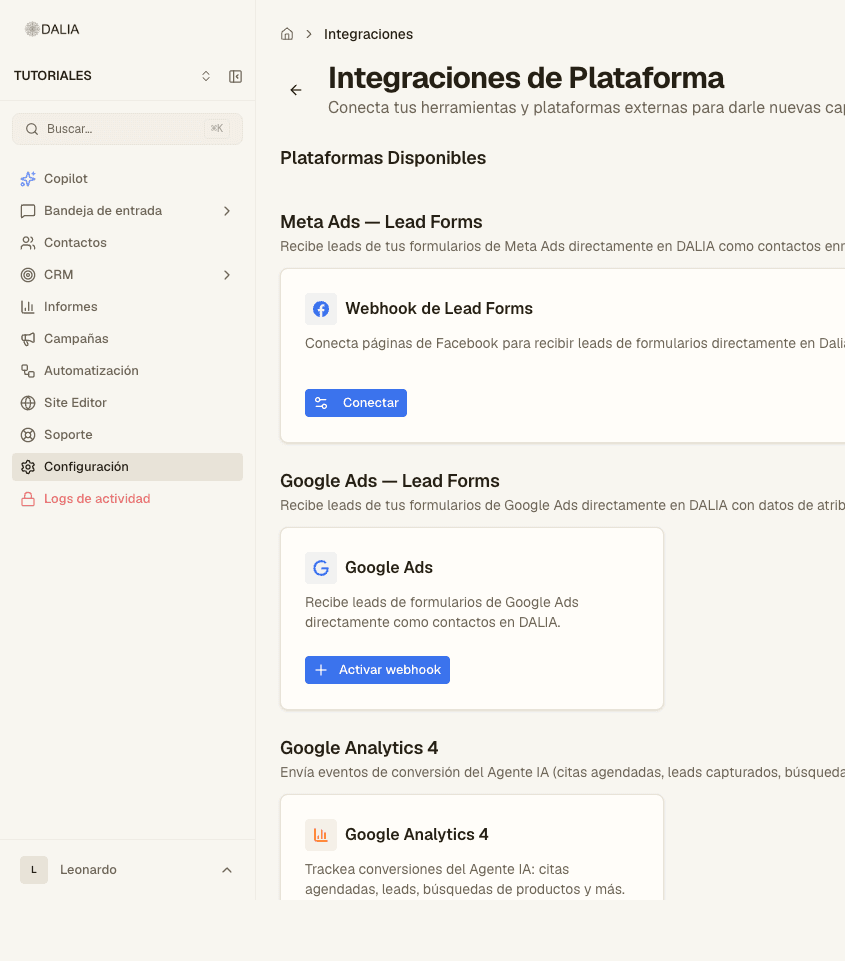
Salesforce, ads, analytics
- Salesforce: import leads and send status back. Separate module.
- Google Ads forms: URL and signing key in Integrations.
- GA4: Measurement ID and secret, for widget events.
Outbound webhooks
A URL of your own receives events (message, contact, label). You can limit them per inbox. n8n is the most common destination.